If you already subscribe to Xfinity cable or internet service, xfinity stream is the tool that changes what your subscription actually means in practice. It is not a standalone streaming service with its own catalog — it is Comcast’s mobile and web-based gateway that extends everything included in your existing Xfinity TV plan to virtually every device you own, wherever you happen to be.
For hobbyist viewers who have built a cable-inclusive entertainment setup and want to watch live TV, on-demand content, and DVR recordings without being anchored to their living room, xfinity stream is the bridge that makes the whole arrangement genuinely flexible. Understanding exactly what it does, what it does not do, and where it performs best requires looking honestly at both its capabilities and its documented limitations.
| 📱 Topic | 📌 Key information |
|---|---|
| 🖥️ What it is | A companion app and web portal for Xfinity TV and NOW TV subscribers; also a content feature for internet-only customers |
| 🆓 Cost | Included at no extra charge for Xfinity TV and internet subscribers |
| 📺 Live channels | 250+ channels on the go for TV subscribers; 40+ for NOW TV; free FAST channels for internet-only users |
| ☁️ Cloud DVR | Full access to cloud DVR library from any device; recordings not subject to in-home-only restrictions |
| 📍 In-home vs. out-of-home | Up to 5 simultaneous streams at home; up to 3 out-of-home streams |
| 📲 Compatible devices | iOS, Android, web browser, Chromecast, Apple TV, smart TVs, Xumo Stream Box, Xfinity Flex |
| 💾 Offline viewing | Download recordings and on-demand content for offline playback |
| ⚠️ Key limitation | Some live channels restricted to in-home Xfinity Wi-Fi; buffering and Chromecast issues reported |
What xfinity stream offers and who it is designed for ?
Xfinity stream exists at the intersection of traditional cable television and modern streaming convenience. Rather than requiring subscribers to choose between the reliability and breadth of cable and the portability of a streaming app, Comcast built xfinity stream to deliver both simultaneously. The core function is simple: any device connected to the internet, whether inside your home on your Xfinity Wi-Fi network or anywhere else on cellular data or a different Wi-Fi connection, becomes a fully functional second screen for your cable subscription.
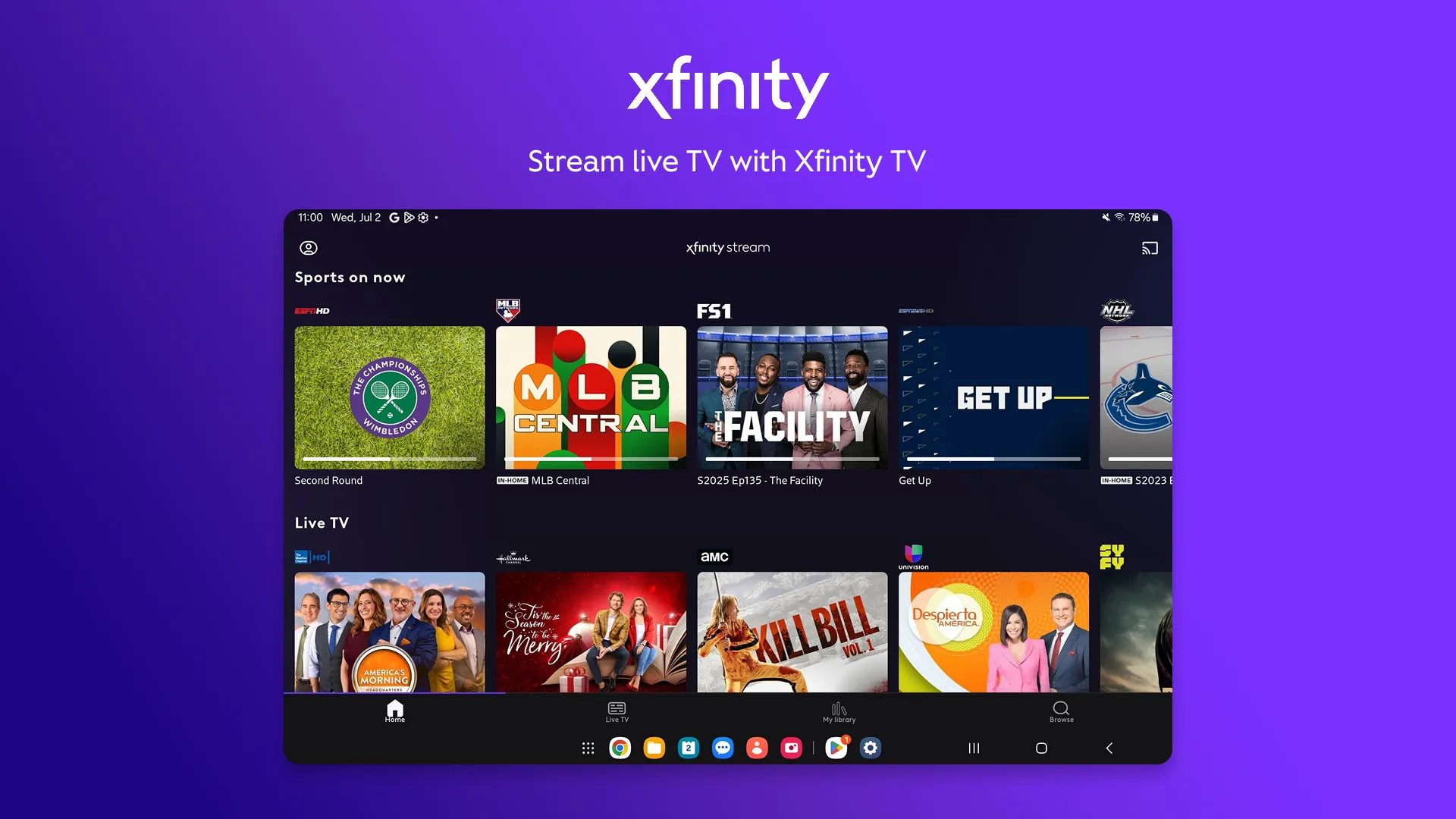
For Xfinity TV customers, this means access to more than 250 live channels on mobile and tablet devices when away from home, and the complete channel lineup when connected to home Wi-Fi. The live TV section of the app presents a familiar grid guide that mirrors the experience of a traditional cable box, organized by channel number with program information available for current and upcoming content. On-demand access covers thousands of shows and movies, and the cloud DVR library is accessible from any device regardless of location, since recordings are stored in the cloud rather than on a physical box.
NOW TV customers — those who subscribe to Xfinity’s lower-cost streaming-only tier without a traditional cable plan — receive a more focused set of 40 or more channels viewable from any device, alongside Peacock Premium access which is bundled into the NOW TV offer. This tier positions xfinity stream as a cable-lite experience for households that want a smaller channel selection at a meaningfully lower price.
Xfinity internet-only customers also have access to a subset of xfinity stream’s features, including free FAST channels (free ad-supported streaming television) and a selection of free on-demand content. This tier does not include live cable channels beyond the FAST library but gives existing internet customers a reason to engage with the platform.
READ ALSO : Streamed.pk: what this free sports streaming platform actually is in 2026
The StreamSaver bundle, available for approximately $15 per month when added to an Xfinity internet subscription, packages Netflix Standard with Ads, Apple TV+, and Peacock Premium into a single line item on the Xfinity bill. This consolidated billing approach simplifies the subscription management process for households that maintain multiple streaming services, and the bundled price is meaningfully lower than subscribing to each of those three services independently at their individual retail rates ($8.99, $9.99, and $10.99 per month respectively as of 2026).
Xfinity stream in practice: features, devices, and how the experience actually holds up
Understanding the practical experience of xfinity stream requires separating what the app is designed to do from what users consistently report in real-world conditions. Both dimensions matter for anyone evaluating whether to lean into this platform as their primary viewing setup.
The feature set is genuinely comprehensive for a cable companion app. The interface is organized into two primary sections: Live TV, presenting the current channel guide, and My Library, which surfaces the cloud DVR collection. The ability to schedule DVR recordings remotely from any device is one of the most practically useful features — a viewer who is away from home and realizes they forgot to record a show can open the app, find the episode, and schedule a recording before it airs, without any additional hardware or setup.
Offline viewing is available for recordings stored in the cloud DVR and for certain on-demand titles that have been licensed for download. This feature is genuinely useful for travel: flights, commutes, or situations where a cellular connection is unavailable or unreliable. The limitation is that downloaded content is tied to the account and the device it was downloaded to, with expiration dates that vary by title.
READ ALSO : Sadisflix: the French streaming platform that millions of viewers keep coming back to
The device compatibility list is broad. Xfinity stream is available on:
- iOS and Android smartphones and tablets, including both phone and tablet form factors, with separate app versions optimized for each
- Web browsers on any computer, accessible through the Xfinity website without any app installation required — a distinction the company specifically highlights as a practical convenience
- Chromecast for casting to a television screen, though Chromecast compatibility generates a disproportionate share of the app’s negative user reviews
- Apple TV and other major streaming device ecosystems
- The Xumo Stream Box, Xfinity’s proprietary device, which provides xfinity stream access on any television through an HDMI connection and runs Xfinity’s Entertainment Operating System for unified app navigation
- Xfinity Flex, the streaming device included with qualifying Xfinity internet plans
The concurrent stream limit is worth understanding before a household commits to xfinity stream as its primary multi-room solution. Most plans allow up to five simultaneous streams on the home network and up to three streams from outside the home. For the average household, this limit is sufficient in most circumstances. Large households with multiple active streamers or situations where devices are left playing in the background can hit the ceiling.
| 📊 Feature | ✅ What works well | ⚠️ Known limitations |
|---|---|---|
| Live TV (in-home) | Full channel lineup on any device on Xfinity Wi-Fi | Some channels restricted to home network only |
| Live TV (out-of-home) | 250+ channels mobile for TV subs; 40+ for NOW TV | Fewer channels than in-home; cellular data required |
| Cloud DVR | Accessible from any device; no expiration pressure | Occasional “loading DVR” errors reported by users |
| Offline downloads | DVR recordings and select on-demand available | Title-specific expiration dates; device-locked |
| Chromecast | Casting to TV supported | Most-reported technical complaint; inconsistent performance |
| Buffering and loading | Strong on home Wi-Fi during off-peak hours | Reported freezing and buffering during peak times, especially on mobile |
| Web browser access | No app installation needed for laptop use | Full features not always available outside home network |
The in-home versus out-of-home distinction and what it means for your viewing habits
One of the most important details for households that rely on xfinity stream as a portable viewing solution is the in-home versus out-of-home access distinction. Not all content within the xfinity stream library is available on the same terms when a device is connected to a different Wi-Fi network or a cellular connection.
Certain live channels — typically those whose licensing agreements include geographic or network restrictions — are configured to stream only when the device is connected to the subscriber’s home Xfinity Wi-Fi network. This is a content rights limitation rather than a technical one: the channel’s licensing terms permit streaming within the household but not unrestricted out-of-home access. When a user attempts to access these channels from a coffee shop, a hotel room, or a mobile connection, they receive an in-home-only error message.
The practical workaround that Xfinity and experienced users both acknowledge is cloud DVR recording. Recordings made through the DVR function are classified as user-initiated copies rather than live streams, and are not subject to the same geographic restrictions as the live channel feed. A viewer who knows in advance that they will want to watch a specific program away from home can schedule a recording and then watch that recording from anywhere with the same quality and without the in-home limitation.
For channels that are unrestricted and available anywhere, the out-of-home experience on a solid cellular connection is generally described by reviewers as stable and reliable during normal usage periods. Peak sports events or primetime programming during high-demand hours introduces more variability, particularly when streaming over cellular rather than a non-Xfinity Wi-Fi connection.
The Xumo Stream Box and how xfinity stream connects to Xfinity’s hardware ecosystem
The Xumo Stream Box is Xfinity’s answer to the question of how to access xfinity stream on a television without having a traditional cable box. The device connects to any television through HDMI, uses the home Wi-Fi network to stream content, and organizes all accessible apps — including the full xfinity stream library alongside Netflix, Disney+, Peacock, YouTube, Prime Video, and other third-party applications — within a unified interface controlled by a single voice remote.
The first Xumo Stream Box is included at no additional monthly fee for Xfinity internet subscribers, making it a zero-marginal-cost addition for existing customers. Additional Xumo boxes for other televisions in the home cost $5 per month each, plus a one-time $15 activation fee for new customers. The device supports 4K playback on compatible televisions for supported content, though 4K availability is limited to certain on-demand titles and integrated apps rather than the full live channel lineup.
The Xumo Stream Box competes with Roku, Amazon Fire TV Stick, and Apple TV in the streaming device market. For Xfinity subscribers specifically, the device’s tight integration with the xfinity stream platform and its simplified billing through the existing Xfinity account makes it a logical choice over a third-party device. General streaming enthusiasts who are not Xfinity subscribers have no particular reason to choose it over more universally compatible alternatives.
The overall xfinity stream ecosystem is most coherent for households already embedded in the Xfinity infrastructure — existing cable or internet subscribers who want to extend their existing subscription to more screens without paying for a separate streaming service. For this specific audience, xfinity stream represents a genuine quality-of-life improvement over the static single-room cable experience at no additional cost. For cord-cutters who are not Xfinity subscribers, the value proposition does not extend beyond the StreamSaver bundle’s consolidated billing convenience, since the core live TV functionality requires an active Xfinity TV plan.